WordPress 7.0 Beta 2 Showed the Bigger Plan: An AI-Ready CMS
WordPress 7.0 Beta 2 made the direction clearer: provider-agnostic AI infrastructure, a more modern admin, and groundwork for more collaborative publishing before the April 9, 2026 release.
WordPress 7.0 Beta 2 arrived on February 26, 2026. Beta 3 followed on March 5. But the interesting part was never just the version number. It was what these betas revealed about where WordPress is going next.
If you expected WordPress to headline 7.0 with a shiny "write this post with AI" button, that is not what happened. Instead, the project is doing something more useful long term: building the plumbing first.
That matters more than it sounds.
Beta 2 was the clearest signal
On the surface, Beta 2 looked like a normal stabilization release. The official announcement framed it mostly as polish before launch, with more than 70 fixes across Core and the editor since Beta 1 and the final release still scheduled for April 9, 2026.
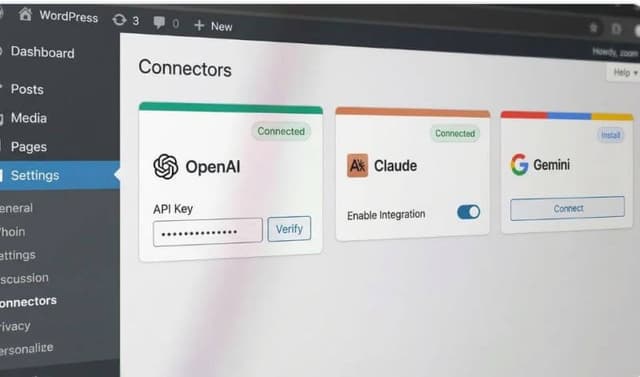
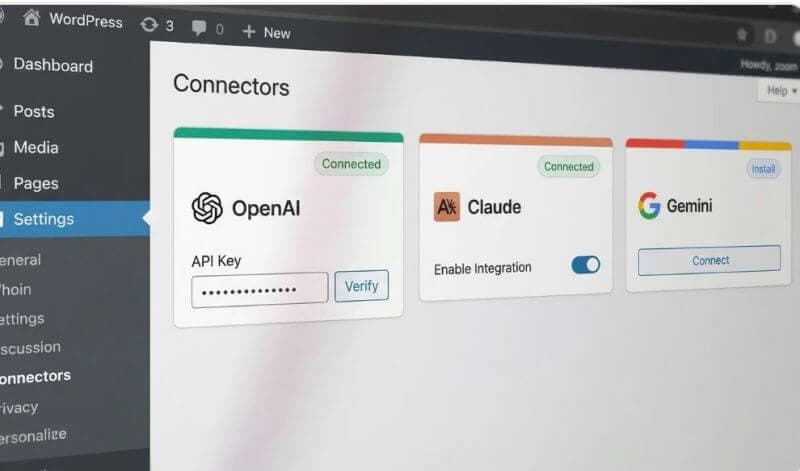
But Beta 2 also introduced one very telling addition: a new Connectors screen in Settings > Connectors.
That screen is not an AI toy. It is infrastructure.
It gives WordPress a central place to manage external AI connections in wp-admin, while also giving plugin and theme developers a cleaner extension point. In other words, WordPress is not trying to force one provider, one workflow, or one branded assistant on everyone. It is trying to make AI integrations behave more like part of the platform.
Beta 3 reinforced the same direction a few days later by expanding how providers are registered on that Connectors screen. So even though Beta 2 was the moment that made people notice, the bigger pattern is still moving forward.
The AI story is infrastructure first
This is the part many people will miss if they only skim the release notes.
WordPress already introduced the Abilities API in 6.9. That gave developers a standardized way to register and expose capabilities in a machine-readable format. During the 7.0 cycle, the proposed WP AI Client pushes that idea further by giving WordPress a provider-agnostic way to talk to generative AI models.
That combination is a bigger deal than a built-in content generator.
Why? Because it means:
- Plugins can build AI features without hard-coding one vendor everywhere
- Site owners can choose the provider setup that fits their budget or privacy requirements
- Hosts, agencies, and product teams can build on a common layer instead of reinventing settings screens, auth flows, and model calls
Just as important, the current proposal is explicit about what WordPress is not doing. Core is not bundling providers by default. It is not automatically sending prompts or site data to external services. And it is not shipping a universal end-user AI assistant inside wp-admin as part of this merge.
That restraint is exactly why this approach looks smart.
This is how a real platform handles AI
There are already enough tools on the market promising instant blog posts, instant product descriptions, and instant everything else. Most of them are fine for demos and weak in real workflows.
WordPress seems to be taking a more durable approach.
Instead of becoming just another AI writing app, it is moving toward being the platform where many AI tools can plug in consistently. That is a much stronger position for an ecosystem as large as WordPress.
If this direction holds, the real winners will not just be bloggers using one new feature. The winners will be:
- Plugin developers building AI features once and reusing the same foundation
- Agencies that need repeatable workflows across many client sites
- Product teams that want AI features without locking themselves into one provider
- Site owners who want more control over privacy, cost, and configuration
That is platform thinking, not feature thinking.
Collaboration is still a roadmap shift, not a finished feature
The "Google Docs for WordPress" idea gets attention for a reason. Editorial teams have wanted smoother multi-user writing for years, especially agencies, publishers, and marketing teams that still draft in one tool and publish in another.
WordPress is clearly moving in that direction through its Phase 3 collaboration work. There is already public architecture work around real-time collaboration in Gutenberg, and the long-term goal is obvious: make shared editing inside WordPress much more natural.
But it is important to be precise here.
WordPress 7.0 is not the moment where full real-time collaboration suddenly arrives as a complete, polished replacement for Google Docs. The better way to say it is this: 7.0 continues the platform work that makes more collaborative publishing inside WordPress increasingly realistic.
That is still significant. Infrastructure changes usually look boring right before they become normal.
DataViews is part of the admin makeover
Another easy detail to underestimate is the continued push around DataViews, DataForm, and the broader admin UI refresh.
If you have spent years inside the WordPress dashboard, you can feel the gap between classic wp-admin and modern SaaS products. WordPress has been powerful for a long time, but it has not always felt modern.
The DataViews work in 7.0 matters because it is helping standardize how data-heavy interfaces are displayed and managed. Lists, forms, filters, layouts, and actions are slowly becoming more consistent across the admin experience.
That does not mean wp-admin suddenly looks like a completely new product overnight. It means the building blocks of a cleaner, more coherent admin are getting stronger.
For developers, that means better primitives.
For everyday users, it means WordPress should gradually feel less like an old-school database panel and more like software designed for current workflows.
The quiet theme of 7.0: stability before spectacle
This is another reason Beta 2 is worth paying attention to.
WordPress could have tried to make 7.0 feel dramatic. Instead, the beta cycle has mostly signaled caution: refine the release, tighten the experience, and make the underlying systems sturdier before the April launch.
That is not boring. That is maturity.
The releases that age well are usually the ones that improve the foundation first. Flashy features get headlines. Infrastructure changes shape the next five years.
What this means for developers and agencies
If you build on WordPress, the takeaway is pretty straightforward.
Do not look at 7.0 and ask, "Where is the one-click AI writer?"
Ask these questions instead:
- How can I build AI features that stay provider-neutral?
- How can I design workflows that use WordPress as the operating layer, not just the publishing layer?
- How can I prepare for better collaboration, better admin interfaces, and more standardized integrations?
Those are better questions because they lead to systems, not gimmicks.
If you are already working on content operations, automation, editorial tooling, or internal admin tools, this release cycle is a signal to pay closer attention now, not later.
Final takeaway
WordPress 7.0 Beta 2 mattered because it exposed the strategy.
WordPress is not rushing to become another generic AI writing product. It is laying the groundwork for an ecosystem where AI tools, editorial workflows, and admin experiences can connect more cleanly inside the platform.
For a CMS that powers a huge share of the web, that is the more important story.
The real shift is not "WordPress added AI."
It is that WordPress is positioning itself to become one of the main places where AI-powered website workflows actually live.
For more on AI-friendly publishing systems, see AI-Assisted Blogging Workflow Without Getting Flagged and How to Rank in AI Search.
Frequently asked questions
Is WordPress 7.0 adding a built-in AI writer?
Not as a core product feature. The 7.0 cycle is focused on AI infrastructure like the WP AI Client, the Abilities API foundation, and the new Connectors screen so plugins and services can integrate more consistently.
When is WordPress 7.0 expected to launch?
The official WordPress 7.0 final release is scheduled for April 9, 2026, based on the current release notes published during the beta cycle.
Does WordPress 7.0 already include full Google Docs-style collaboration?
Not yet. Real-time collaboration remains part of the broader Phase 3 roadmap, but the direction is clear: WordPress is moving toward better multi-user editing and shared editorial workflows.
About the Author
Shoaib Zain
We test themes, plugins, and performance tactics to publish clear, trustworthy guides for WordPress and content sites.
Read more about us